I have had a version of the same conversation with a dozen firms over the past few months. Someone forwards an Intapp announcement and asks whether they should be paying attention to Celeste, the DealCloud MCP Server, or both. The two names sit next to each other in the release notes, both have AI attached to them, and the practical difference between them is not obvious from the outside.
So here is the plain version, along with what we are actually seeing work in our own instance and in client environments.
The Short Answer
Celeste is an AI coworker that lives inside your Intapp platform. It is grounded in the client, deal, relationship, and engagement data already sitting in your Intapp products, and it runs on your firm’s governance rules. It also does more than answer questions, because it updates records and drafts follow-ups while running prebuilt use cases through governed playbooks. If what you want is a resource that behaves like a staffed analyst with compliance guardrails around it, that is Celeste.
The DealCloud MCP Server is a door. It gives a compatible AI assistant a secure, consistent way to ask DealCloud for context and get structured answers back. The assistant connects to the server, discovers which tools are available, and calls them to get responses in a predictable format, scoped to the permissions of the person asking.
The way we frame it for clients is that Celeste keeps the intelligence inside your Intapp platforms, while the MCP Server lets you bring your DealCloud context out to whichever assistant your team already works in, Claude included.
Where the Early Value is Showing Up
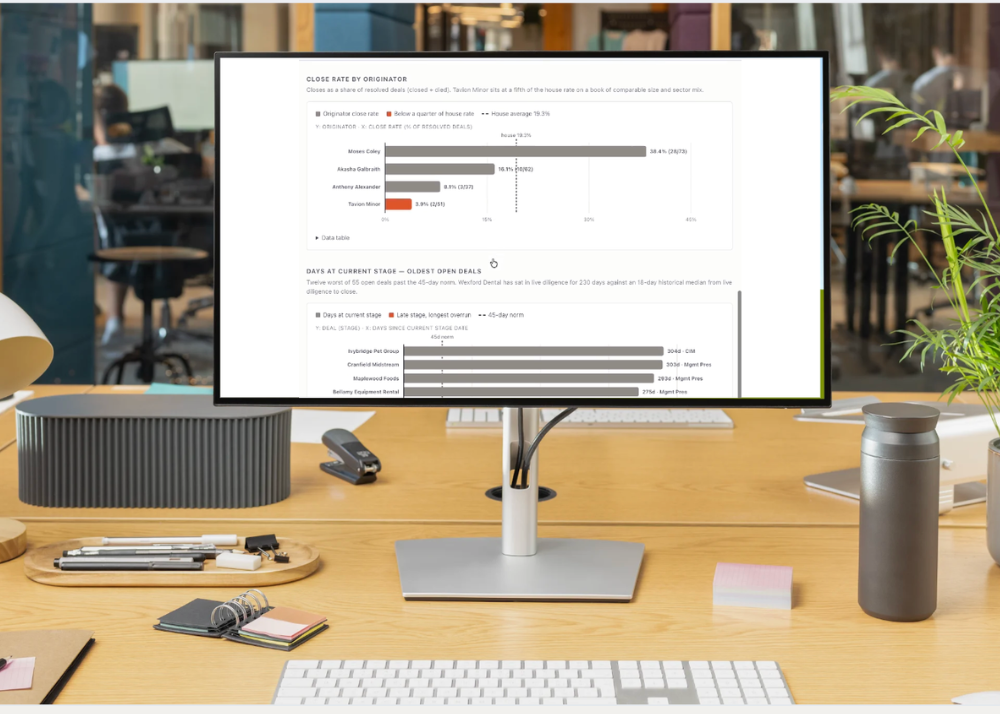
If you want the clearest example of what the MCP layer makes possible, look at pipeline reporting.
DealCloud is very good at telling you what is in your pipeline right now. That is what it was built to do, and a well-configured instance does it cleanly. However, reporting what has changed, which deals have slipped since last month, or which ones have gone quiet and for how long takes more effort.
Most firms answer those questions by having an analyst pull an export and work through it manually, and then they do it again the following week.
With an MCP connection, an assistant can read the current state of your instance and compare it against prior periods, then write you a narrative instead of another dashboard. It can tell you what is stalling and for how long. It can flag what needs a partner’s attention this week and where the forecast is drifting from plan. It can also run on a schedule, so the report is sitting in your inbox before the Monday pipeline meeting rather than being assembled during it.
We are building variations of that pattern for a few different seats. The common thread is that these are all questions your data can already answer; they simply were a manual and time-consuming effort each time the questions were asked.
Permissions, Which is the First Question Every Ops Lead Asks
It is a fair question, and the answer is reassuring.
The MCP layer applies the DealCloud user permission model. A user can access only the data they are permissioned for, exactly as they would through the web portal or the API. If someone lacks access to specific objects, fields, or records, those restrictions carry through to their MCP connection as well. Authentication runs through an OAuth sign-in flow that establishes a per-user connection, so the assistant operates as that person rather than as a service account with the keys to everything.
That said, inheriting your permission model is a floor and not a strategy. A few things we recommend:
Know the difference between the default and custom servers, then decide what fits your firm.
A default MCP Server ships out of the box, tied to your site’s default schema, which means all objects and all fields are in scope. There is no schema scoping or server configuration required, so it is the fastest way to get started. Admins can also create custom MCP servers, each paired with a Schema Contract so that the server exposes only the objects and fields in that contract. That gives you a way to separate access by team, by workflow, or by client application, and to hand a specific application its own defined server and contract pairing. Which one makes sense depends on how your instance is structured and how tightly you need to control exposure, and that is a conversation worth having with whoever owns your permission model before you publish anything.
Audit your permission model before you expose it, not after. In our experience, most instances have accumulated a few permission assignments that no longer reflect how the firm is organized. Nobody notices, because nobody was running unusual queries. An AI assistant is very good at running unusual queries. If a stale permission is going to surface something awkward, it is much better to find it during a scoped pilot than in front of an investment committee.
Your taxonomies matter more now than they did last year. An assistant reads your field values literally. If deal stages are applied inconsistently across teams, or the same sponsor exists three times under slightly different names, the report you get back will be confidently wrong. This is the unglamorous data work we talk about constantly, and MCP raises the return on having already done it.
Watch what people actually ask. The questions your team puts to an assistant in the first month are the best roadmap you will ever get for your instance, because they tell you which reports are missing and which fields nobody trusts.
How Hard the MCP is to Set Up
Honestly, it is not extremely difficult, assuming someone on your side knows their way around DealCloud administration.
You need DealCloud with a Celeste license. On the permissions side, admins need Manage MCP Servers in order to configure, and end users need MCP Access in order to connect.
The setup is the easy part. What takes real judgment is deciding what to scope and which workflows are worth automating first, then building a prompt that produces a report a partner will actually read instead of a wall of text. That is where the work lives.
We have a library of use cases we can help you build, and after 4,500 projects across 1,400 clients we have a strong sense of which ones pay off early and which ones look impressive in a demo and then go unused. If you want help with the configuration, or you want us to build custom workflows on top of your MCP connection, that is squarely what we do.
Getting value out of this is not a matter of turning on a feature. It is a series of decisions about what you scope and which questions are worth asking every week. I am happy to talk through yours. Reach out here.